


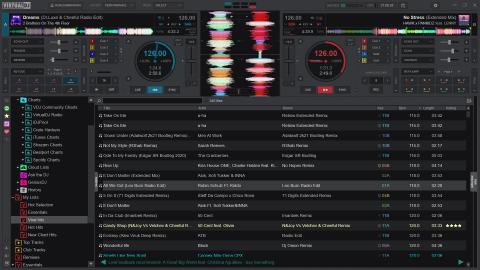
I’ve been using VirtualDJ since 2018 — not just as “DJ software”, but as a platform I can shape. Over the years I’ve built personal skins and controller mappings to fit my workflow, and I’ve had consistently good experiences with both the support team and the forum/community. That combination — powerful customization + real people behind it — is a big reason VirtualDJ has stayed on my machine.
But VirtualDJ isn’t “new”. It’s the opposite: it’s the result of decades of iteration.
According to VirtualDJ’s own licensing page, the project started back in 1996, originally aimed at helping new DJs learn without the cost of traditional gear. And after many versions and names over time, VirtualDJ says that in 2014 everything was unified under the VirtualDJ umbrella. (If you ever touched older “ancestor” editions, that history matters — it’s a long-running product, not a short trend.)
So what makes VirtualDJ relevant right now? For me it comes down to three pillars:
1) compatibility with real-world setups,
2) feature depth (audio + video + library),
3) customization that goes beyond “preferences”.
1) Compatibility: hardware freedom, not hardware anxiety
VirtualDJ’s official product pages are very direct about this: plug-and-play support for 300+ controllers, plus deep mapping tools (midi-learn, custom mappings, and scripting). That’s not just marketing — it shows up in how quickly you can get a setup usable, then refine it into something personal.
And the mapping side is where VirtualDJ becomes “a system”, not just an app. VirtualDJ documents that it ships with predefined mappings for most MIDI/HID controllers, and that you can tweak or completely rewrite how gear behaves. Under the hood, that’s powered by VDJscript — VirtualDJ’s command language used in skins, shortcuts, and controller mappers. If you like to build your own workflow instead of accepting the default, that’s a huge advantage.
2) The feature set: stems, video/karaoke, streaming, and the “extra” tools
VirtualDJ has always played in a wider lane than “two decks and a browser”.
• Real-time stems (and the 2020 shift)
VirtualDJ’s stems page notes that it first introduced real-time stems separation in 2020, and later evolved to “Stems 2.0” for higher quality separation. Whether you use stems for quick clean transitions, mashups, or live edits, the key point is this: stems are treated as a core feature, not an afterthought.
• Video & karaoke as first-class features
VirtualDJ’s ecosystem has long taken video mixing and karaoke seriously — and that matters if you do open-format, events, bars, weddings, or hybrid DJ/VJ nights. It’s one of the few “major” DJ platforms where video/karaoke doesn’t feel bolted on.
• Streaming inside the software
VirtualDJ’s homepage positions streaming as a major pillar: access to large partner catalogs directly inside the software, discovery via charts, and playlist building from within the interface. If you’re a “requests happen” type of DJ, this is part of the modern toolkit (with all the usual caveats: stable internet, licensing, offline planning, etc.).
3) VirtualDJ 2026: what changed, and why it matters
VirtualDJ 2026 landed as the “Welcome to VIRTUALDJ 2026” release build in the official changelog: Build 8962 dated 16 December 2025.
The headline features in that release are genuinely practical:
• Lyrics-assisted waveforms
VirtualDJ 2026 can display AI-generated lyrics as part of the waveform. That’s not just “cool AI” — it’s a navigation tool. It makes vocal sections visually findable, which can speed up word-play mixing, phrasing decisions, and live edits.
• AI Prompt folder
The AIPrompt folder is about set-building ideas directly inside the browser (VirtualDJ describes it as leveraging an LLM to get track ideas you can drag and drop). The important framing: it’s still your taste and your selection — this just reduces friction when you’re building or pivoting.
• New professional FX engine (122+ effects)
VirtualDJ 2026 also introduces a revamped FX engine with more than 122 effects, including many modeled after popular hardware FX styles. If you play across venues and rigs, that “hardware-familiar FX vocabulary” is a big deal.
• Plus: lyrics visualization video plugin, automatic karaoke from audio tracks, duplicates tooling, and more.
And after release, the changelog shows quick follow-up builds improving lyrics editor behavior, karaoke FX, and stability — exactly the kind of iteration that matters for real-world use.
Licensing note (because it matters):
VirtualDJ’s official pricing page makes the tiers clear: Free for beginners with no pro equipment; Home at $4/month for entry-level controller use; Pro at $19/month for professional use and broad controller support; Business at $99/month for mission-critical support and services. (Prices can change, but that’s the official baseline listed by VirtualDJ.)
Library portability: playlists + cloud (including Dropbox)
This is the part that quietly saves hours.
• Reading/importing playlists from major DJ ecosystems
VirtualDJ’s own manual states that it supports third-party software playlists — including iTunes playlists and playlists/crates from Serato, Traktor, and Rekordbox (and more). In practice, that means you can often bring your organization with you instead of rebuilding from scratch.
• CloudDrive + Dropbox
VirtualDJ’s changelog for VirtualDJ 2024 (Build 8055 dated 1 April 2024) introduced CloudDrive: syncing lists to the cloud and streaming them easily from anywhere, using providers that include Dropbox (alongside Google Drive, OneDrive, and iCloud). If you’re building a resilient library workflow, CloudDrive is one of those features that becomes more valuable over time.
Community and support: the underrated “feature”
Features are great — but what keeps software alive is the ecosystem around it.
VirtualDJ’s community hub highlights forums, blogs, addons, and a culture of sharing (including skins, effects, mappings, and troubleshooting). That’s been my experience too: when you’re building custom skins/mappings, community knowledge is priceless, and it’s one reason VirtualDJ feels like a platform you can grow inside.
Closing thought
VirtualDJ’s story is basically a story of endurance: long-running evolution, wide hardware support, deep customization, and a feature set that doesn’t ignore video/karaoke/event realities. VirtualDJ 2026 continues that direction with lyrics-driven workflow, an AI-assisted browser tool for ideas, and a modern FX engine — while still letting power users build their own “version” of the software through skins and mappings.
If you’re the kind of DJ who wants one tool that can adapt to your setup (instead of forcing you to adapt to it), VirtualDJ remains one of the strongest choices in the game.
VirtualDJ 2026 changelog (release + features):
https://virtualdj.com/products/virtualdj/changelog.html
Pricing/licensing (Free/Home/Pro/Business):
https://www.virtualdj.com/products/virtualdj/price.html
Hardware + “300+ controllers” positioning:
https://www.virtualdj.com/products/virtualdj/
Playlists support (Serato/Traktor/Rekordbox/iTunes, etc.):
https://virtualdj.com/manuals/virtualdj/interface/database/playlists.html
VDJscript (mapping/skins language):
https://www.virtualdj.com/wiki/vdjscript.html
Legacy products + “unified under VirtualDJ umbrella” note:
https://www.virtualdj.com/products/legacy.html
Screenshots:
https://www.virtualdj.com/products/virtualdj/screenshot.html
Community hub / forums:
https://virtualdj.com/community/
https://virtualdj.com/forums/